

Finding a rental home in Singapore often feels harder than it should be. You may already know your budget. You may also know where you need to live – close to work, near your children’s school, or within a comfortable commute to the MRT. Yet, even with those basics in place, the search can still feel overwhelming.
Instead of clarity, you are often met with long, repeated listings, and endless scrolling – only to end up with homes that still do not quite fit your needs. Time is lost, expectations are reset, and many renters end up stretching their budgets simply because they cannot see their real options clearly.
This is the gap that 99.co’s Home Finder is designed to address.
Table of contents
- Why renting still feels unnecessarily hard
- Seeing your real options, not just a list
- How Home Finder works
- What you see when you click select a project
- Planning ahead, even when nothing is available
- Where to find Home Finder on 99.co
- Case 1: Hannah, finding a rental that fits her travel-heavy schedule
- Case 2: Mr Tan, securing a family rental while waiting for a new home
- Stop scrolling and start finding with Home Finder today
Why renting still feels unnecessarily hard
Despite Singapore’s reputation as a highly digital and connected city, the rental journey remains surprisingly fragmented. This is happening even as the market operates at a significant scale, with more than 130,000 rental transactions each year. Yet the way rental information is presented has not kept pace with this volume.
While filters exist, they rarely show how price, location, and availability interact in real life. Many platforms offer maps, but these often function as simple pin locators. They show where individual listings are, without helping renters understand what fits their budget, supports their daily routines, or offers better value within the same area.
As a result, renters are left piecing information together manually. Most searches also focus on individual listings, with little visibility at the project level. Without this context, it becomes harder to judge whether a development makes sense as a whole, even if a single unit appears suitable.
This challenge is further shaped by demand patterns. Singapore has a non-resident population of about 1.9 million, many of whom rely on renting as their primary housing option. At the same time, more local households are choosing to rent for longer periods – whether due to lifestyle preferences, longer construction timelines, or deliberate financial planning. Even so, the tools used to search for homes have evolved far more slowly than the market itself.
For many renters, this disconnect becomes obvious during the search. It is common to spend four to eight weeks viewing homes, navigating repeated listings, and attending viewings that do not quite work out, all while gradually adjusting expectations along the way.
Along the way, another familiar question often surfaces: at this price point, should I be looking at an HDB or a condominium? Without a clear way to compare value across different housing types, renters are left guessing whether they are paying for space, location, amenities, or simply scarcity.
Over time, a few common pain points emerge:
- Homes that look affordable but are far from daily commitments
- Listings that fit the location but push the upper limits of the budget
- Limited visibility on nearby alternatives, including whether similar HDB or condo options might offer better value
In other words, the issue is not a lack of listings. It is a lack of clarity.
Without a way to see how budget, location, and value intersect, decisions are often made reactively rather than confidently. And in a market this large and competitive, that gap matters.
Seeing your real options, not just a list
This is where Home Finder changes the experience.
Instead of asking you to piece together information across multiple pages, Home Finder brings everything into one clear view. Your budget, your preferred location, and your housing needs are shown together, so decisions can be made with more confidence.
At its core, Home Finder allows you to explore rental homes based on what truly matters, price comfort and location suitability, rather than forcing you to compromise blindly.
More importantly, it helps you understand trade-offs early, instead of discovering them too late in the process.
How Home Finder works
Once Home Finder is opened, the first step is simple. You set your price range, property type, and bedroom needs. From there, you can anchor your search to locations that matter, whether that is your workplace, your child’s school, or a specific neighbourhood you prefer.
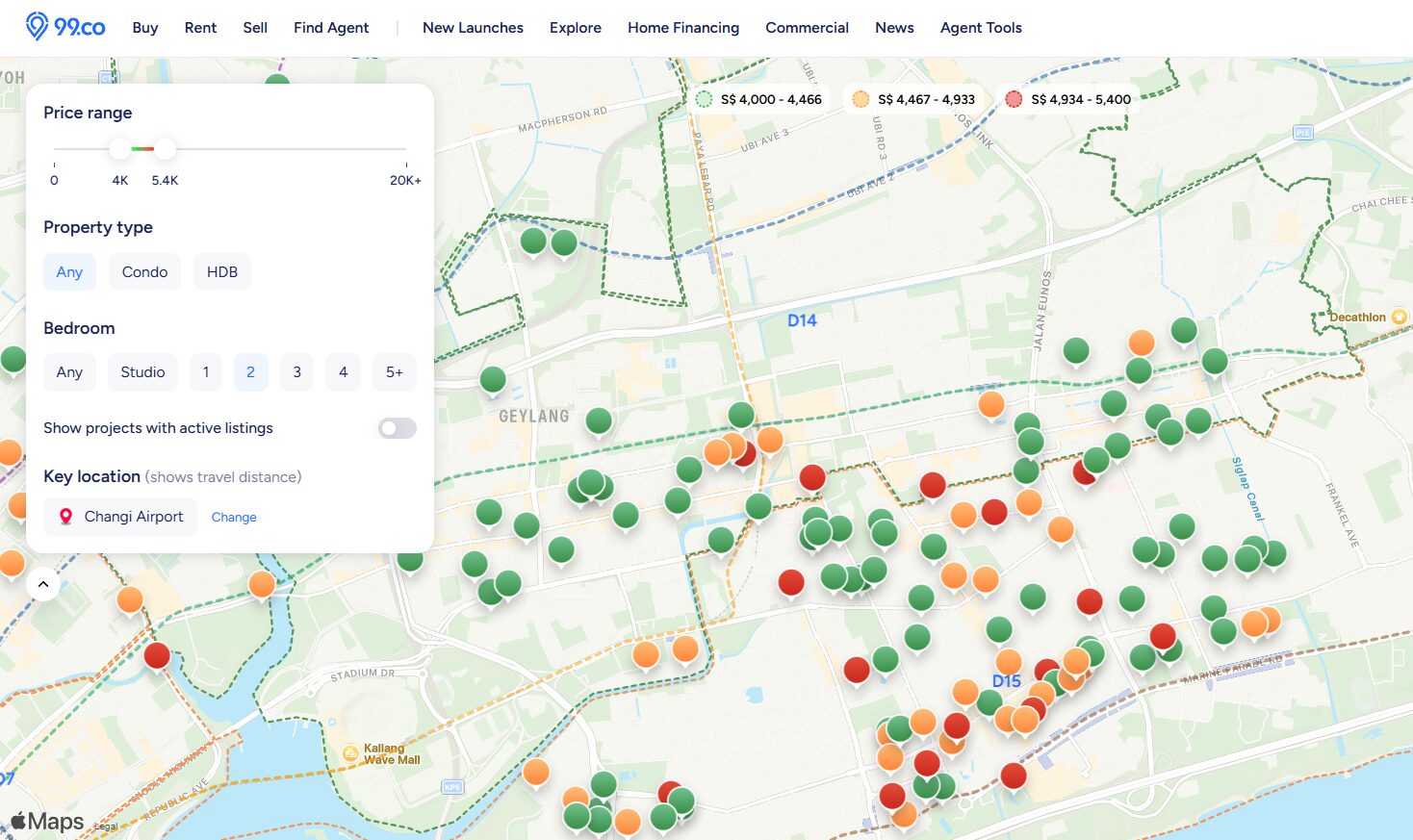
After your town or location is selected, your available options are displayed visually within the area on an interactive map. Each project is represented by a coloured pin, which immediately signals where it sits within your chosen budget range.
- Green pins indicate options on the lower end of your range
- Yellow pins sit closer to the middle
- Red pins show homes approaching your upper limit
Because of this, you are not just seeing what is available. You are seeing what is comfortable, what is stretching, and what may require reconsideration.
This visual clarity allows decisions to be made earlier, and more realistically.
What you see when you click select a project
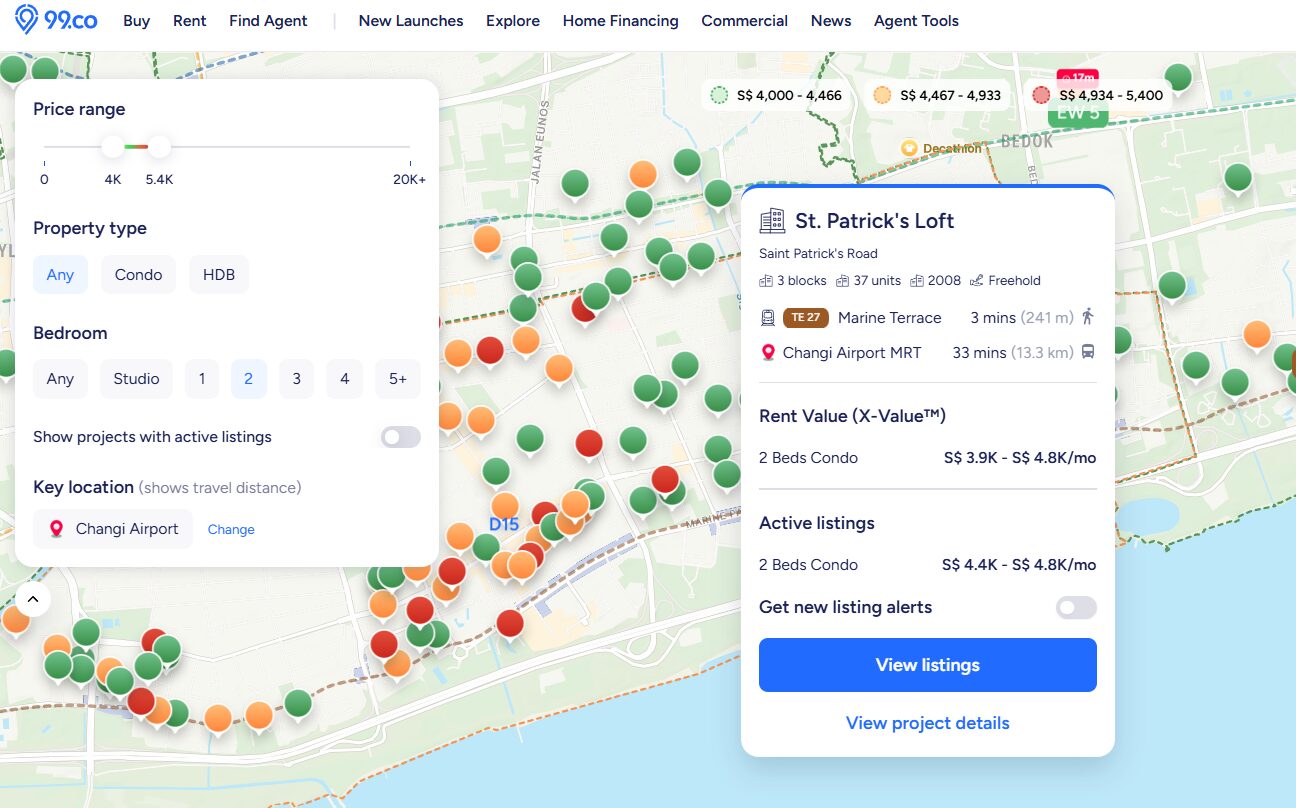
Clicking on any pin reveals detailed project-level information, all in one place.
First, you’ll see the project name and its exact location. From there, key details are laid out clearly, including the number of blocks and units, the year the project’s lease commenced, and whether it is a leasehold or freehold development.
Nearby MRT stations are also shown clearly, along with estimated walking or travel times in minutes to both the station as well as your preferred location. This makes it easier to judge daily convenience without guessing.
Next, nearby MRT stations are shown, along with estimated walking or travel times. These include distances to the station itself, as well as travel times to your selected location. As a result, daily convenience can be assessed quickly, without relying on guesswork.
You’ll also find rent prices from X-Value™, which provides a data-led rental value range based on nearby and comparable homes. This offers helpful context, allowing you to see whether a listed price is in line with market expectations.
After that, active listings within the project are displayed, together with their current price ranges. By comparing these asking rents against X-Value™, it becomes easier to tell whether a unit is priced fairly, slightly above market, or potentially good value.
When you’re ready to explore further, clicking “View listings” takes you straight to the results page, with your preferences already applied. Nearby options within a 2km radius are also shown, so relevant alternatives are not overlooked.
Planning ahead, even when nothing is available
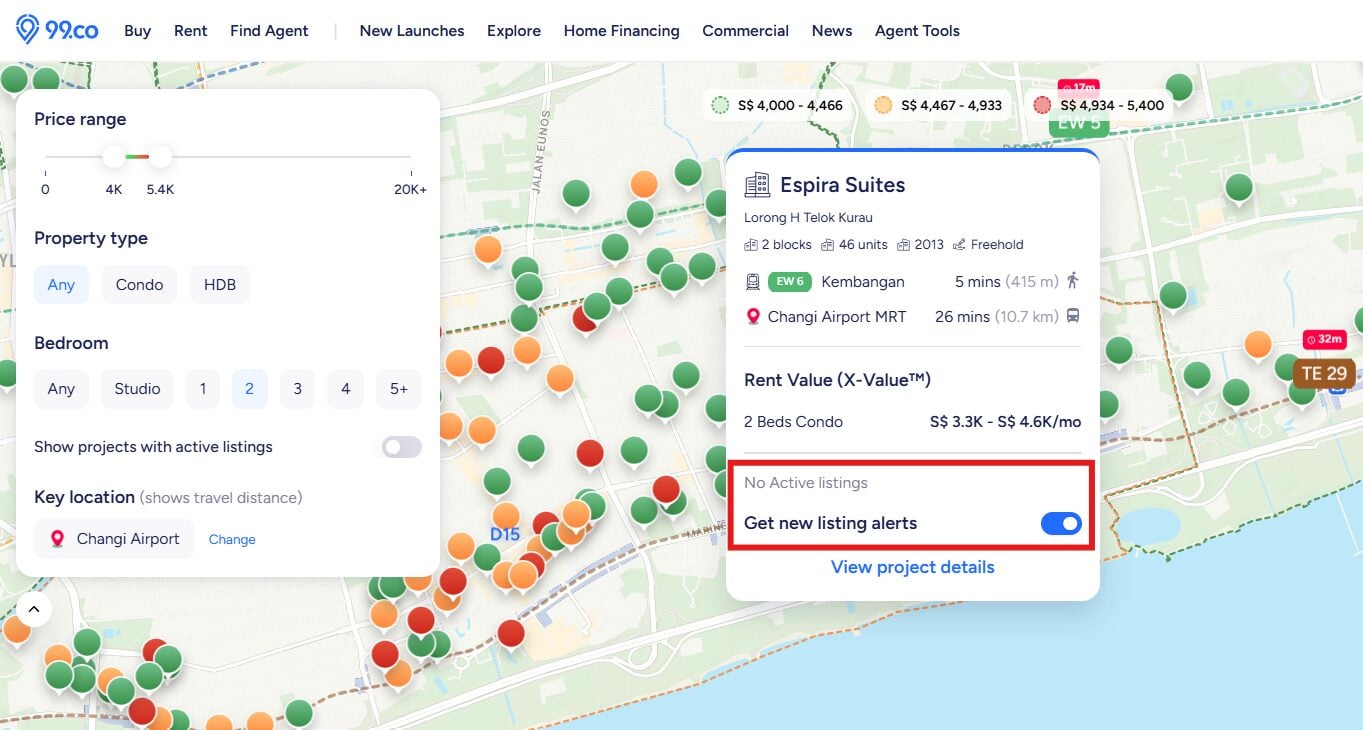
Another challenge renters often face is timing. Sometimes, the right project exists, but no units are available at the moment.
Instead of hiding these options, Home Finder keeps them visible. This allows you to see projects that fall within your budget, even if there are currently no active rental listings.
To support forward planning, a toggle lets you set alerts for new listings. When a suitable unit becomes available, you can be notified early – before the rush begins. This feature is especially useful for renters with fixed timelines, such as families waiting for a new home to be completed or professionals planning a relocation.
Where to find Home Finder on 99.co
Home Finder is easy to access, and there are several entry points depending on how you usually browse.
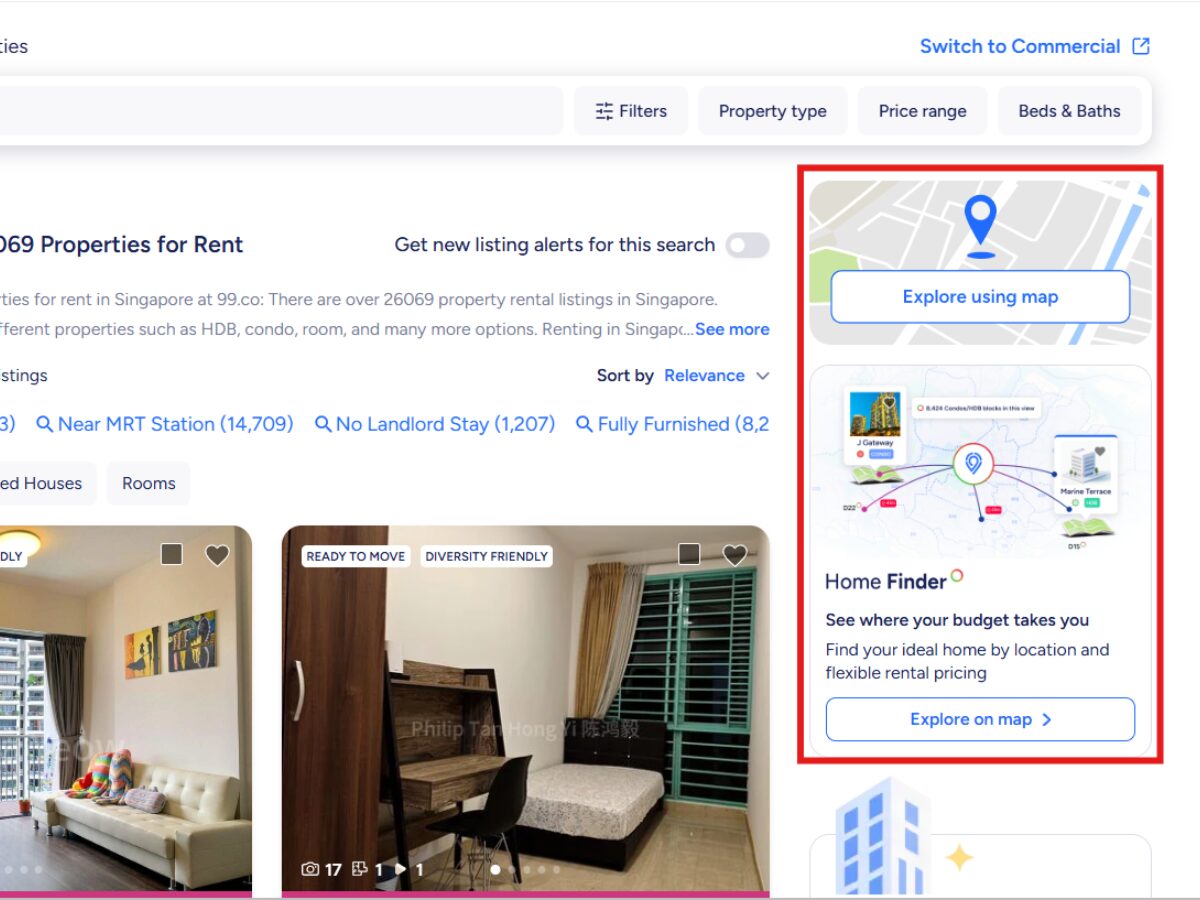
You can find it directly from the rental search results page. Alternatively, from the 99.co homepage, selecting “Rent” or “Room” will reveal Home Finder at the bottom right of the screen.
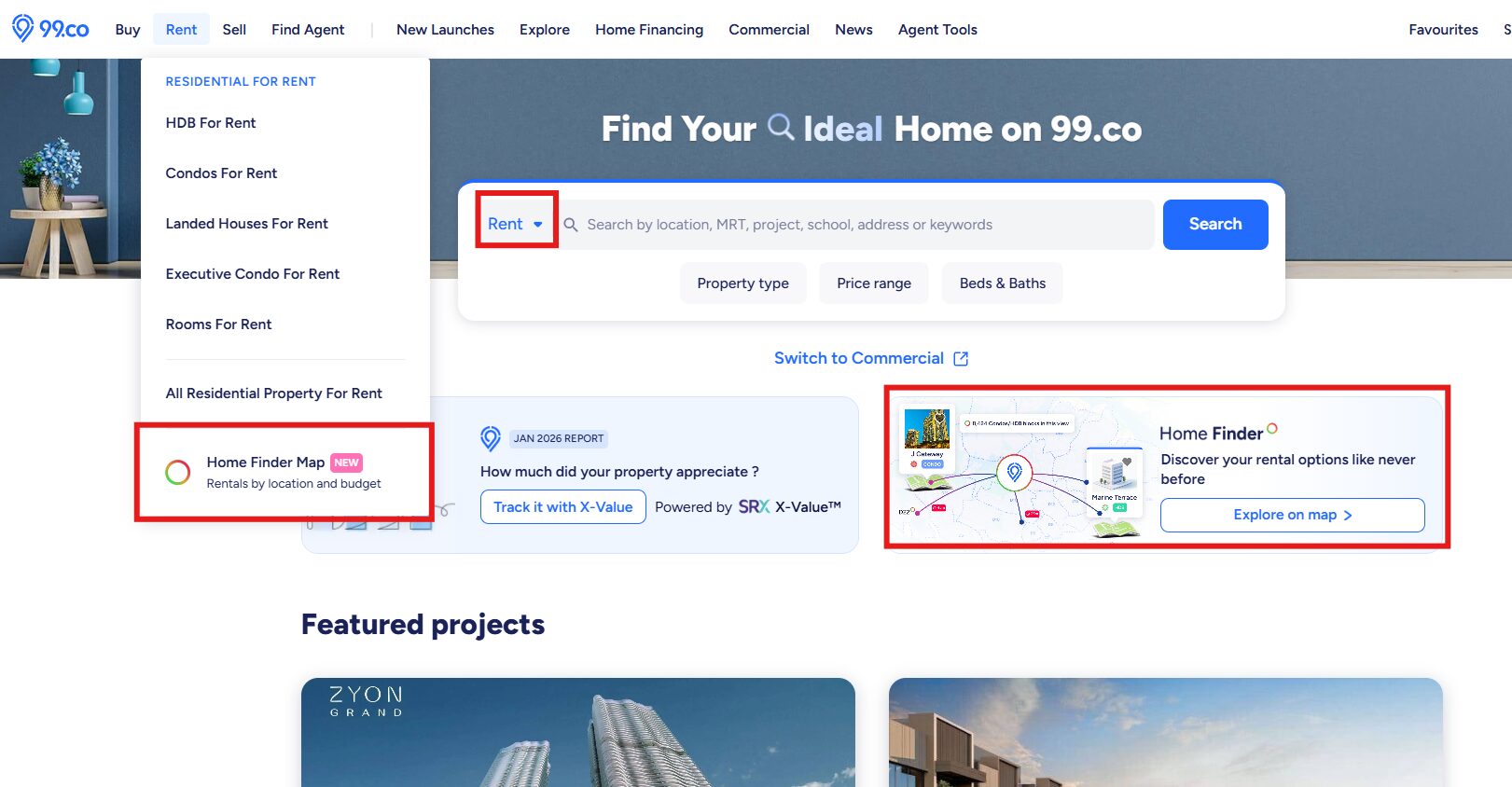
It is also available within the “Rent” dropdown menu, alongside options such as HDB or condo rentals. From there, Home Finder can be launched with a single click.
Case 1: Hannah, finding a rental that fits her travel-heavy schedule

To see how Home Finder works in practice, let’s follow Hannah, a 36-year-old APAC sales manager who travels frequently for work. With early-morning and late-night flights, keeping travel time to Changi Airport manageable is a priority. At the same time, she wants to stay within a firm rental budget.
Here’s how she narrows things down using Home Finder.
Step 1: Set a clear budget range
Hannah starts by setting her price range at S$4,000 to S$4,500 for a 2-bedroom unit. This immediately removes listings that would push her beyond her comfort zone, even if they are well-located.
Step 2: Focus on airport-friendly locations
Instead of searching by town alone, Hannah anchors her search around areas with direct and efficient access to Changi Airport. She focuses on locations such as Paya Lebar, MacPherson, and Aljunied, where East–West Line connections keep travel times predictable.
Once these areas are selected, the map fills with coloured pins. Hannah pays particular attention to the green pins, which indicate options on the lower end of her budget range.
Step 3: Shortlist and compare value
From the map, Hannah narrows her options down to three projects, all offering 2-bedroom units and travel times of around 20 to 23 minutes to Changi MRT.
She clicks into each project to compare details. One option stands out. The project’s X-Value™ rental range sits between S$4,000 and S$5,900 per month, based on nearby comparable units. However, an active listing within the development is available at S$4,200 per month. With MRT access clearly shown and the price sitting well within her budget, and below the upper end of the project’s value range, the choice becomes straightforward.
Hannah secures the unit at S$4.2K, keeping her commute efficient while staying comfortably within budget. Instead of guessing or compromising, she makes a clear, informed decision using Home Finder.
Case 2: Mr Tan, securing a family rental while waiting for a new home

Now let’s look at Mr Tan, a 52-year-old father of two. His family has sold their previous home to avoid incurring additional taxes on their next purchase. While their new home is under construction, they are looking to rent for the interim.
Although temporary, the rental still needs to support everyday family life.
Both of Mr Tan’s teenage daughters attend the same secondary school in Bishan, so staying close to school is a priority. He is looking for a 3-bedroom unit that offers enough space for a family of four.
Here’s how he uses Home Finder to narrow his options.
Step 1: Set a sustainable family budget
Mr Tan starts by setting his price range at S$4,500 to S$5,500 and sets the room filter to 3-bedrooms.
Step 2: Anchor the search around the school
Instead of browsing multiple towns, Mr Tan anchors his search around Bishan, focusing on projects within easy travel distance of his daughters’ school. The map populates with coloured pins, allowing him to quickly identify projects that fall within budget and those that sit closer to the upper limit.
He focuses on the green and yellow pins, which indicate options that meet his space and budget needs without requiring major compromise.
Step 3: Compare options and choose with confidence
With the map narrowed to Bishan, Mr Tan compares several 3-bedroom projects that meet his S$4,500 to S$5,500 budget and place his family within a 15-minute commute of his daughters’ school.
After weighing location, space, and rental value, he selects a 3-bedroom unit priced at S$5,200 per month. The home keeps his family close to school, fits comfortably within budget, and provides the space they need during the interim period.
With clarity on both price and location, Mr Tan secures the rental knowing it supports his family’s routines today, while giving them flexibility as they plan their next long-term home.
Stop scrolling and start finding with Home Finder today
For renters today, the challenge is no longer just finding a home. It is about finding the right home without unnecessary stress.
Home Finder was built to bring clarity to that process. By showing how budget and location work together, it helps renters make informed choices earlier and with greater confidence. At the moment, Home Finder supports rental searches. However, resale options are already in development, with more features planned ahead.
For now, it offers a clearer starting point – one that replaces endless scrolling with informed decisions, and uncertainty with visibility.
The post 99.co’s Home Finder: Where budget, lifestyle, and travel time finally meet appeared first on .
